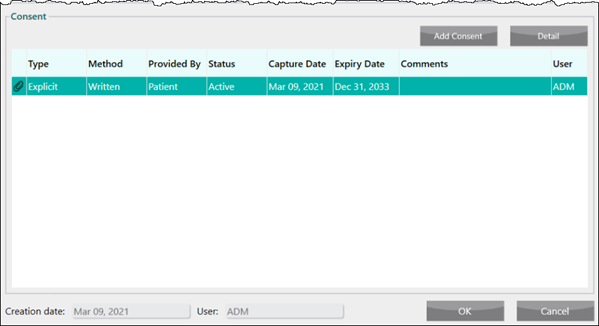
Person in Care Consent
Gathering consent from a Person in Care is mandatory when adding a new relationship, Caregiver or Agent. Until consent has been added, the Caregiver will not be able to manage prescriptions or received notifications, either through Rexall Reminders or the BeWell app and the Agent should not pick up prescriptions for the Person in Care.
Consent is required for a Person in Care's, regardless of their age. A consent form must be scanned into the Consent window for consent to be approved.
Consent Window
Consent is added in the Consent window through the Relationships tab. To learn more about the Consent window, select the highlighted sections below.
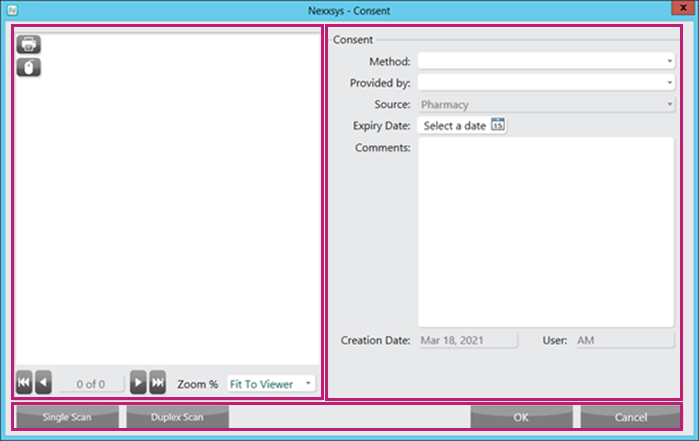
Gathering Consent
Consent can be gathered and added when creating a new relationship, or added to an existing relationship. This can done on either the Caregiver's or Person in Care's profile. For more information about creating a new relationship, see Adding a New Relationship.
To add consent to a relationship:
-
Search for and select either the Caregiver or the Person in Care.
-
On the Main tab, select the Relationships tab.
-
Highlight the relationship and select Detail.
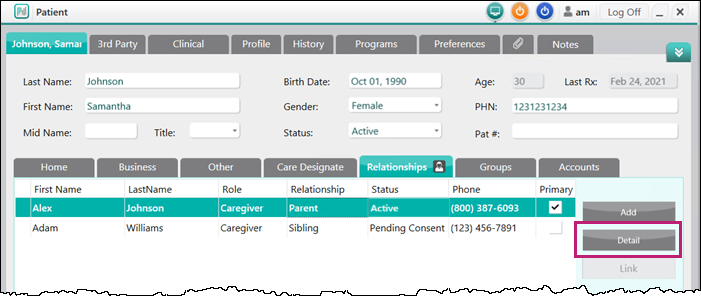
The Relationships window opens.
-
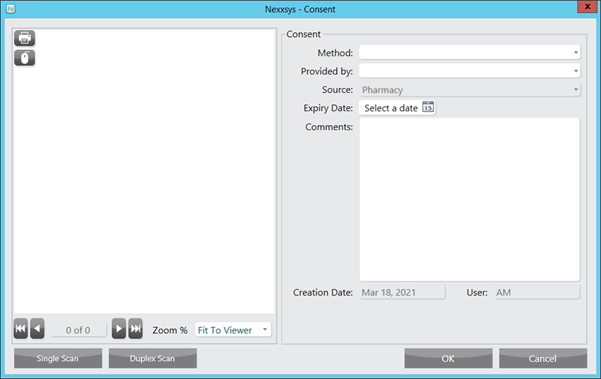
Select Add Consent. The Consent window opens.
-
Enter the following information:
-
Method
-
Provided by
-
Optional - Expiry Date
Note: If the Person in Care is younger than 14 years old, the Expiry Date field is automatically populated to one day prior to the Person in Care's 14th birthday. Once the Person in Care is 14 years old, consent needs to be renewed.
-
-
Select Single Scan or Duplex Scan to attach the consent form.
-
Select OK. The Consent window closes to the Relationships window and a new row displays in the Consent section.